Purchasing a laptop for school is an important investment and families have a range of options available. You may choose to purchase through your school’s recommended BYOD Purchasing Portal or from a retailer of your choice.
For the best experience, we strongly recommend purchasing through the BYOD Purchasing Portal. Devices available through the portal have been selected to meet school requirements, are designed for everyday student use, and include warranty and support options that provide additional peace of mind for families, and help ensure a smooth setup and onboarding experience. Find out more about the Purchasing Portal here.
Alternatively, you can purchase from an independent retailer. However, it’s important that you review the Catholic Schools of Maitland Newcastle BYOD minimum specifications below to inform your purchase, as devices that connect to the school’s networks must meet these requirements.
The number of laptop choices available can be overwhelming. While devices may appear similar, differences in performance, durability, battery life and warranty coverage can significantly affect how well a device supports learning over many years of school use.
The specifications below are intended to help families make an informed purchasing decision and avoid buying a device that may struggle to meet the demands of classroom learning.
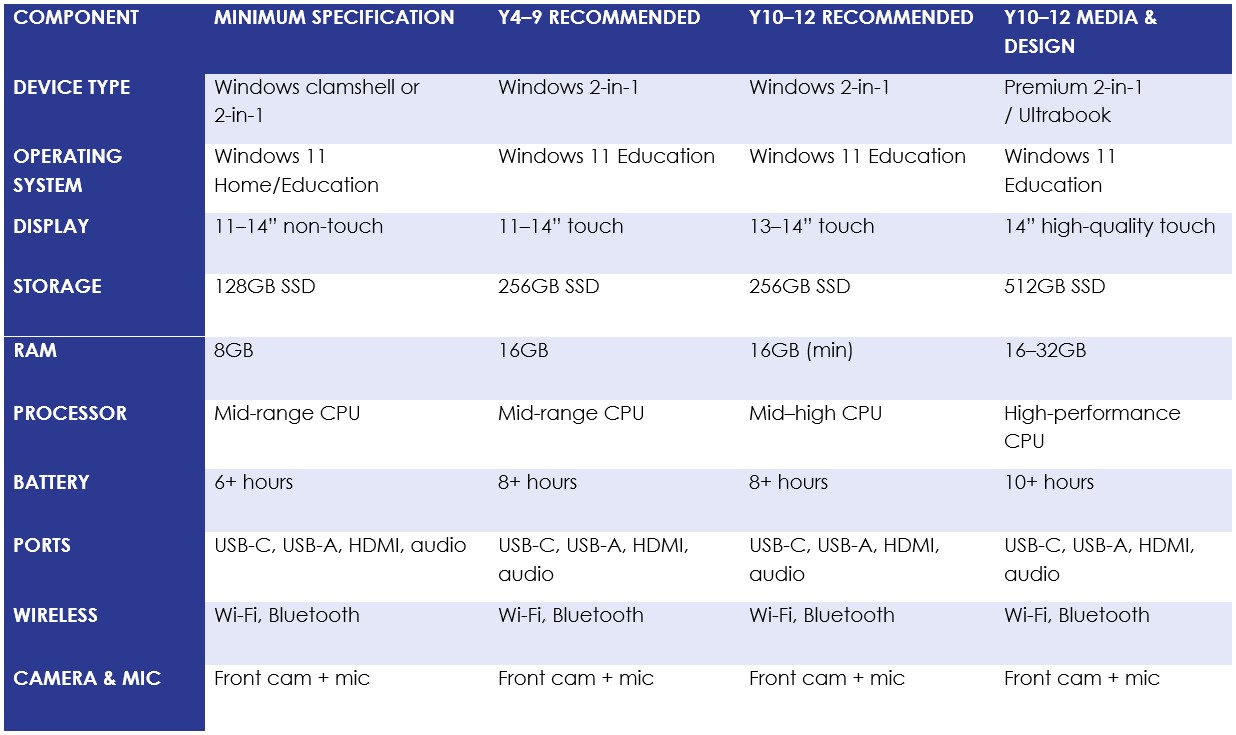
Operating System
Recommendation
Recommended: Windows 11 Education OR Windows 11 Pro
Minimum: Windows 11 Home
Why?
Our schools use a Microsoft Windows learning environment. Devices running Windows 11 Education or Windows 11 Pro provide the simplest setup experience and the best compatibility with school systems.
Devices purchased through the BYOD Purchasing Portal come with Windows Education pre-installed, which means less setup for families and a smoother onboarding experience for students.
Devices with Windows 11 Home can still be used, however they will require additional setup steps. A free upgrade to Windows Education is available as part of the BYOD setup process.
DO NOT purchase a non-Windows device such as a Chromebook or Apple Mac.
CAUTION- Check Windows S Devices meet all minimum specifications before purchasing. Some devices come with Windows 11S. Windows S-Mode is a scaled down version of Windows that takes up less memory on the device but does not allow apps outside of the Windows Store to be loaded on the computer. This limits what applications can be used for learning. Also, it cannot be used for sitting NAPLAN online or installing security certificates.
If you are considering purchasing an S-Mode device, please ensure it meets the minimum standards and S-Mode is disabled before sending the device to school.
Display
Recommendation
Recommended: 11 to 14 inch with Touch Screen & Stylus capabilities (often called 2-in-1)
Minimum: 11 inch screen non-touch
Maximum: 15inch
Why?
11 to 14 inch screens are the standard size of student devices. Larger screens mean a bigger device and more weight. You should consider your child’s visual and physical needs. 11 inch devices are small enough to carry and large enough to work on, 14 to 15 inch should be the largest size you will need to purchase. Touch screens are advertised as 2-in-1 devices. They normally include or have a compatible stylus pen available to use with the device. This enables students to interact with the device using a pen and utilise inking tools in programs. Consider your child’s learning needs and preferences and whether the ability to draw on their screen will support their learning.
Hard Drive (storage)
Recommendation
Recommended: 256GB or greater SSD
Minimum: 128 GB Solid State Drive (SSD) highly recommended
Why?
There must be enough storage on the device to install Windows 11 and the M365 suite of software as well as various other applications that will be downloaded to use on the device. SSD are by far the more reliable, durable and consistent due to there being no moving parts.
RAM (working memory)
Recommendation
8GB or greater
Why?
We recommend 16GB as a minimum to ensure students can utilise all programs effectively. When a program is opened, it operates through the working memory. Anything less than 8GB means that the working memory cannot cope with multiple programs being used at once and either slows down its functioning or shuts down a program in the middle of use.
Battery Life
Recommendation
Minimum 6 hours
Why?
Students will need at least six hours battery life. We also recommend that the device has USB-C Charging. This makes it easier to quickly charge the device when needed through any USB-C charging cable.
Camera and Microphone
Recommendation
It is recommended that the device has both a camera and microphone.
Why?
This provides access to multimedia responses to classroom tasks without having to use a separate device, downloading it and adding it to the task. Most devices should have a front facing (faces the user) web-camera. If possible, a back facing camera is also useful. Check that the device comes with a built-in microphone.
Ports
Recommendation
- USB C charging
- USB C
- USB 2 and/or USB 3
- Headphone/Mic jack
- HDMI
Why?
The ability to connect to other devices is important. You will need to ensure you have the appropriate type and number of ports to connect your peripherals. E.g.
- Mouse
- Headphones
- External storage device
HDMI and USB C ports will allow the student to connect their device to an external monitor.
Keyboard
Recommendation
English (US) Keyboard
Why?
In Australia, the English (US) Keyboard layout is the standard used. There are subtle differences compared to the English (UK) layout. This is an important consideration when purchasing online.
Warranty, IT Support and Insurance
Extended Warranty
Recommendation
Extended warranty is recommended.
Why?
Each new device by law comes with a 12-month warranty. When purchasing your device from a retailer, you may be offered an optional extended warranty and or insurance at an additional cost. Please ensure you check the terms and conditions for these products before purchasing to ensure they meet your needs.
Battery Replacement
Recommendation
It is recommended that battery replacement be included as part of the warranty.
Why?
Even when devices are looked after, generally the first component that might fail on a device when it is approaching ‘end of life’ will be the battery. Battery replacement can often be included as part of the warranty and the terms of replacement may vary between different brands. Check the Terms and Conditions of the extended warranty.
IT Support
Recommendation
Consider carefully.
Why?
When you buy products in this market, you will probably be offered 24 hour IT support. This could be an option for you. However, please note that it is technical support – not advice on how to use a particular software program. Students will learn how to use software applications at school.
Accidental Damage Protection
Recommendation
Accidental damage protection is recommended.
Why?
Accidental damage is one of the most common reasons families need to repair or replace a school device. Damage can occur during travel to and from school, in school bags, or through everyday student use.
Accidental Damage Protection can significantly reduce the cost of repairs and minimise disruption to learning. Families should review the policy carefully and understand any applicable excesses or limitations.
Many devices available through the BYOD Purchasing Portal include multi-year accidental damage protection as part of the package.
Insurance
Recommendation
Insurance is recommended.
Why?
This could be an option through your Home and Contents Insurance provider or could be added on as a separate policy. Insurance may cover the device for accidental damage that could occur when device is out of the home.
Accessories
Mouse
Recommendation
Optional.
Why?
Mouse may be either wired or wireless. Wired is less likely to be lost. However, some students prefer to use a touch pad. Be guided by your child’s preference.
Headphones
Recommendation
Essential.
Recommended: Integrated microphone
Why?
A set of headphones that has an integrated mic as well are best as this can be used for creating multimodal texts and accessing learning tools such as Immersive Reader. Headphones are essential for enabling students to access video and audio learning materials without disturbing other students in class.
Stylus
Recommendation
Optional.
Why?
If the device has a touch screen a stylus is recommended to enable students to write and draw.
Protective Case
Recommendation
Essential.
Why?
Various types of protective cases are available, but the best form of protection is a hard carry case.
Gaming Apps
Recommendation
Highly discouraged.
Why?
This is an educational tool. Gaming apps will slow down the device’s operational ability and may also make it vulnerable to viruses.
Microsoft 365
Recommendation
Purchase not required.
Why?
The M365 suite is provided to every student of Maitland-Newcastle Diocese. Each student qualifies to download M365 on up to five devices. Students will be guided through downloading these applications during setup process at school.
Third Party Virus Software
Recommendation
Consider Carefully.
Why?
Windows operating systems come with Windows Defender. Other Virus software such as McAfee etc., have been known to bloat the computer, slow it down and conflict with diocesan systems, making the user experience frustrating. Keeping Windows OS and Defender updated is usually sufficient.